2. Class - F5 SSL Orchestrator
This class covers the following topics:
- Configuration of transparent forwarding proxy
- Configuration of gateway reverse proxy
- Configuration of explicit forwarding proxy
Expected time to complete: 3 hours
2.1. SSL ORCHESTRATOR LAB ENVIRONMENT
The lab environment for this guide has provided some prerequisite settings that you should be aware of. These are provided to make the demo simpler. All of the following would need to be configured manually in another environment.
- Client side VLAN and subnet are defined – this is the VLAN that an internal client connects to for outbound traffic flows. SSLO does not define the client-side VLAN(s) and self-IP(s). A web server also exists on the client side VLAN to facilitate an inbound (reverse proxy) use case – external client to an internal set of websites.
- Outbound side VLAN and subnet are defined – this is the VLAN that traffic egresses from SSLO to the Internet gateway. SSLO does not define the server-side VLAN(s) and self-IP(s).
- ICAP service VLAN and subnet are defined – SSLO does not define the networking for this service type, so it has been pre-created in this lab.
- CA certificate and private key are installed – this is the CA certificate and private key that are used to re- issue (forge) remote server certificates to internal clients for outbound traffic flows.
- Server certificate and private key are installed – for the inbound (reverse proxy) traffic flow use case, SSL traffic is terminated at the F5, and re-encrypted on the way to the internal application environment. A wildcard server certificate is installed to facilitate using any name under the “.f5demolabs.com” sub- domain.
Note
It is a security best practice to isolate security devices within the protected network enclaves provided by SSLO. Customers will often desire NOT to move or change existing security services. Howerver, while possible with SSLO 4.0 and beyond, passing this decrypted traffic to points on an existing network architecture could create multiple points of data exposure. Usernames, passwords, credit card numbers and other sensitive information could be exposed to other devices on that network. Each inline layer 3 security service definition includes an “Auto Manage” option. This option, enabled by default, provides internal network setting for security services to use, so that only theinterface (and 802.1q VLAN tag as needed) is required to be defined for the inbound and outbound interfaces. Should customers opt to not follow security best practices, or simply need different networking setting, you can disable the Auto Manage option and define all of the required inbound and outbound network settings manually.
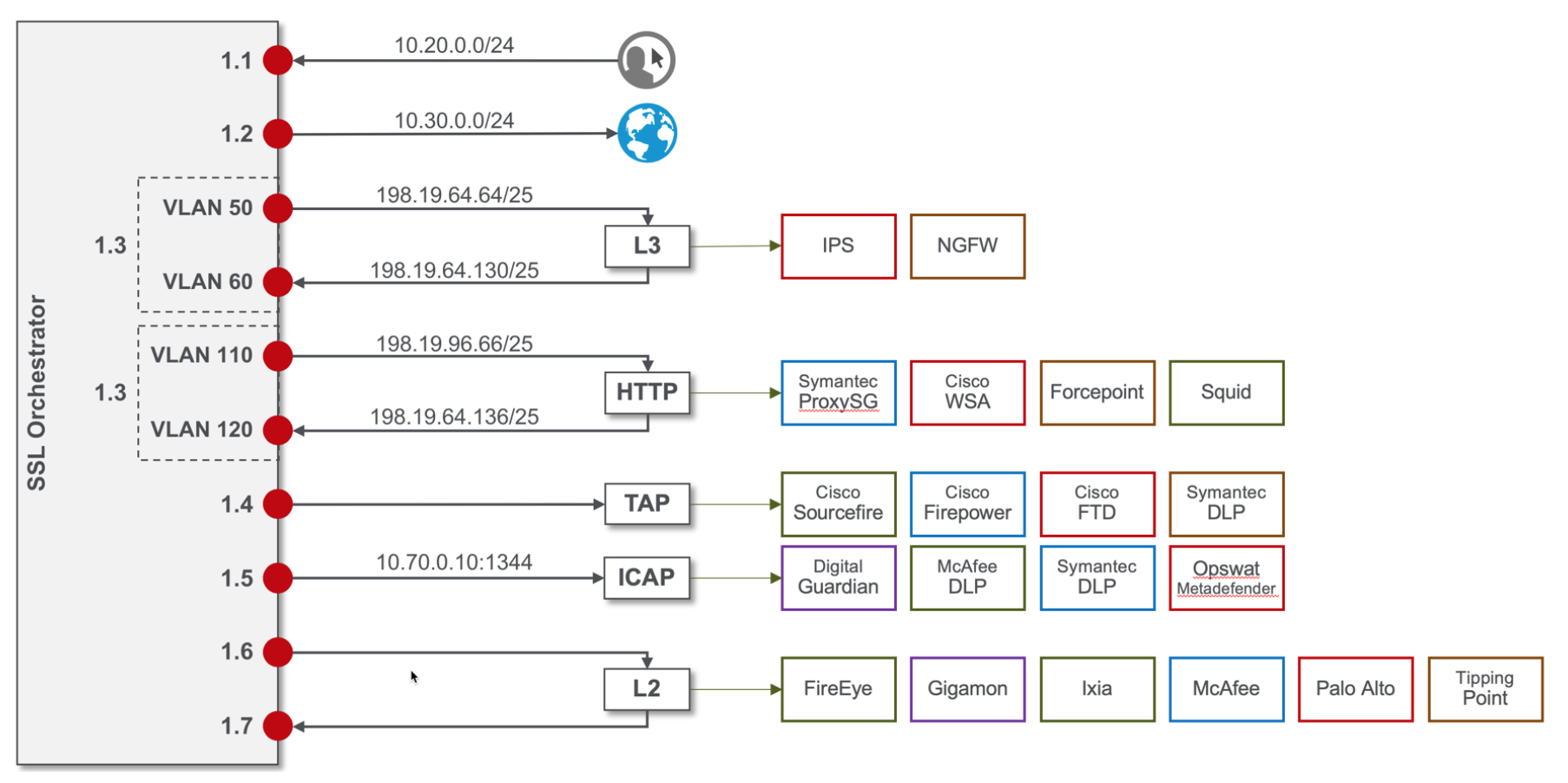
2.2. Topology – SSLO
| SSL Orchestrator | BIG-IP management IP | 10.10.0.110 | |
| Gateway IP/DNS | 10.30.0.1 | ||
| Login | admin:admin | root:default | ||
| Interfaces | Client VLAN | 1.1 | |
| Outbound VLAN | 1.2 | ||
| Inline L3/HTTP services | 1.3 (tagged) | ||
| TAP service | 1.4 | ||
| ICAP service | 1.5 | ||
| Inline L2 service inbound | 1.6 | ||
| Inline L2 service outbound | 1.7 |
| Inline layer 2 service | Login | student:agility |
| Inline layer 3 service | Login | student:agility | ||
| Interfaces | Inbound interface | 1.3 tag 50 | 198.19.64.64/25 | |
| Outbound interface | 1.3 tag 60 | 198.19.64.130/25 | ||
| Explicit proxy service | Login | student:agility | ||
| Interfaces | Inbound interface | 1.3 tag 110 | 198.19.96.66/25 | |
| Outbound interface | 1.3 tag 120 | 198.19.96.136/25 | ||
| Services | Squid | Port 3128 | ||
| Receive-only service | Login | student:agility |
| MAC address | 12:12:12:12:12:12 (arbitrary if isolated) |
| ICAP service | Login | student:agility |
| IP Address:port | 10.70.0.10:1344 | |
| REQ/RES URLs | /squidclamav |
| Internal web server | Login | student:agility |
| IP Addresses | 10.20.0.90 | |
| *.f5demolabs.com | 10.20.0.91 | |
| 10.20.0.92 (Apache2 instances listening on HTTPS port 443) |
| Outbound client | Login | student:agility |
| IP address | 10.20.0.60 (RDP and SSH) |
| Inbound client | Login | student:agility |
| IP address | 10.30.0.70 (RDP and SSH) |
- 2.2.1. LAB 1 – CREATE A TRANSPARENT FORWARD PROXY SSLO
- 2.2.2. LAB 2 – CREATE A GATEWAY REVERSE PROXY SSLO
- 2.2.3. LAB 3 – CREATE AN EXPLICIT FORWARD PROXY SSLO
- 2.2.4. LAB 4 – DELETE AN SSLO CONFIGURATION
- 2.2.5. TROUBLESHOOT SSLO
- 2.2.6. APPENDIX – COMMON TESTING COMMANDS
- 2.2.7. APPENDIX – ROUTING CONSIDERATIONS FOR LAYER 3 DEVICES
- 2.2.8. APPENDIX – DEMO SCRIPTS